



There is no single standard ERP system price in Malaysia. Some cloud ERP providers charge a fixed monthly subscription, while customised ERP projects may involve separate costs for setup, implementation, data migration, training, integration and ongoing support.
For example, ECOUNT currently publishes a monthly ERP subscription, while Sorable publishes implementation-based pricing for customised ERP projects. These examples show how different ERP pricing models can be, and they should not be interpreted as PannaAge pricing.
Therefore, comparing ERP systems by the advertised licence fee alone rarely shows the full cost.
How Much Does an ERP System Cost in Malaysia?
The cost of an ERP system in Malaysia varies widely because different businesses require different modules, users, workflows and levels of implementation support.
A small trading company may mainly need sales, purchasing, inventory and accounting functions. A manufacturer may require a broader setup covering production planning, material control, costing, procurement and warehouse operations.
The final cost can therefore depend on:
- Number of users
- Number of modules
- Number of branches or warehouses
- Deployment model
- Data migration requirements
- Customisation
- Third-party integrations
- Employee training
- Implementation support
- Ongoing maintenance and support
Even two companies of a similar size can receive very different ERP quotations when their operating requirements are different.
This makes the scope of the ERP project just as important as the software price itself.
What Should Be Included in an ERP Budget?
An ERP budget should account for the full project rather than only the software subscription or licence.
The main cost components normally include:
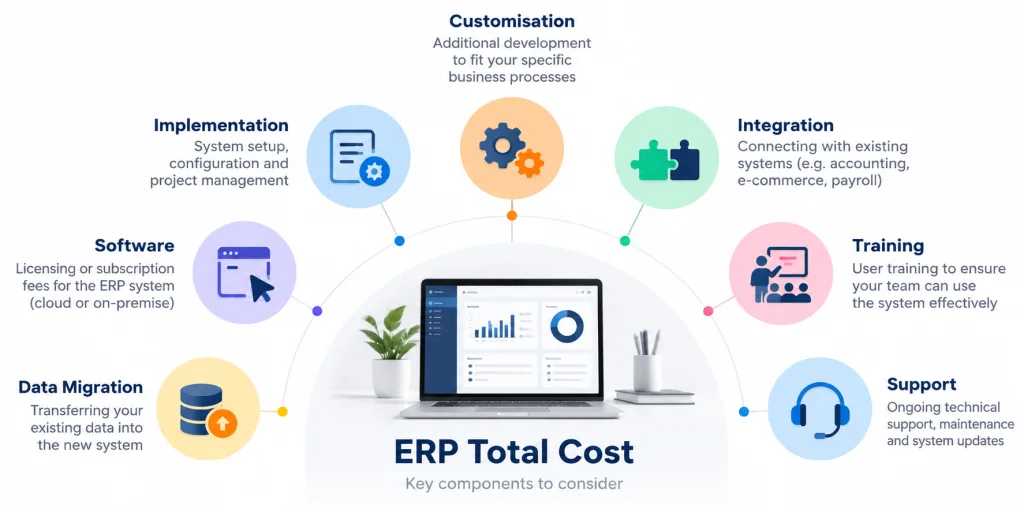
| Cost Area | What It May Include |
|---|---|
| Software | Subscription or software licence |
| Implementation | System setup, configuration and project implementation |
| Data Migration | Preparing and transferring existing business data into the new ERP |
| Customisation | Adjusting workflows, forms, reports or functions to business requirements |
| Integration | Connecting ERP with accounting, HR, barcode, e-Invoice or other systems |
| Training | Training employees to use the system correctly |
| Support | Technical support, maintenance and system updates |
A lower monthly subscription can look attractive initially. However, the final project cost may be considerably different if implementation, migration, integrations or support are charged separately.
For this reason, businesses comparing ERP quotations should check which services are already included and which will incur additional charges.
Software Cost vs Implementation Cost
The software cost generally refers to the licence or subscription required to access the ERP.
The implementation cost covers the work required to configure and prepare the system for actual business use.
Implementation may involve:
- Workflow configuration
- Data migration
- User permissions
- Custom reports
- System integration
- Testing
- Employee training
- Go-live support
A relatively affordable software package can therefore still require a substantial implementation project when the business has complex processes.
This distinction is particularly important when comparing ERP quotations from different providers.
Why Can ERP Prices Differ So Much?
ERP prices differ because the scope of work can vary significantly from one company to another.
A business using a standard cloud package may require relatively little configuration. Another company may need its ERP to connect sales, purchasing, inventory, production, accounting, HR or barcode operations.
The existing business environment matters as well.
A company moving from spreadsheets may need significant work to clean and prepare its existing data. A business replacing an older ERP may have more complicated migration and integration requirements.
Customisation can also affect the project cost. Standard functions may be sufficient for one company, while another may require specialised reports, approval processes or workflows.
Defining these requirements before requesting quotations makes it easier for ERP providers to estimate the actual implementation scope.
Cloud ERP vs On-Premise ERP: How Does the Cost Differ?
Cloud ERP and on-premise ERP generally use different cost structures.
Cloud ERP Costs
Cloud ERP normally places more of the cost into a monthly or annual subscription.
The provider generally manages the hosting environment and system infrastructure, reducing the need for the company to maintain its own ERP servers.
Typical costs may involve:
- Subscription fees
- Implementation
- Data migration
- Configuration
- Integration
- Training
- Ongoing support
Cloud ERP can therefore reduce some upfront infrastructure requirements, particularly for SMEs without large internal IT teams.
On-Premise ERP Costs
An on-premise ERP is installed within infrastructure controlled by the business.
Depending on the system, this may introduce additional costs such as:
- Server hardware
- Software licences
- Database requirements
- IT administration
- Security
- Backup
- Maintenance
- System upgrades
The upfront investment may consequently be higher, although the long-term cost depends on the ERP provider, infrastructure and business requirements.
Businesses should compare the cost over several years rather than evaluating deployment models purely by their initial price.
Is a Lower-Priced ERP Always More Cost-Effective?
Not necessarily. A lower-priced ERP can be cost-effective when its standard functions already match the company’s requirements.
Problems arise when employees still need extensive manual work outside the system.
For instance, staff may continue:
- Re-entering the same information
- Maintaining separate Excel files
- Consolidating reports manually
- Checking stock across different records
- Moving information between departments manually
These activities consume employee time and can gradually reduce the savings gained from choosing a lower-priced system.
If employees still rely on spreadsheets, repeated data entry or manual reporting after implementation, the business may continue spending resources on processes the ERP was meant to simplify.
For SMEs comparing ERP systems, the initial software price should therefore be considered alongside implementation costs, ongoing support and how well the system fits existing operations. A system that costs slightly more upfront may still provide better long-term value if it reduces manual work and supports the business without extensive workarounds.
What Information Should You Prepare Before Asking for an ERP Quote?
A clear description of the business requirements helps an ERP provider estimate the project more accurately.
Before requesting a quotation, prepare information such as:
- Number of users
- Departments involved
- Number of branches
- Number of warehouses
- Current software
- Required ERP modules
- Existing manual processes
- Data migration requirements
- Reporting requirements
- Required integrations
- Approval workflows
- Expected future expansion
The requirements can also differ significantly according to industry.
ERP Requirements for Manufacturing Companies
Manufacturers may need ERP functions covering production planning, procurement, raw materials, inventory, costing and financial processes.
Panna XERM.Mfg is designed for manufacturing environments and connects processes including sales fulfilment, procurement, inventory, production and financial accounting.
A manufacturer should therefore document its production and material workflows before requesting an ERP quotation. This gives the provider a clearer understanding of the processes the system needs to support.
ERP Requirements for Trading and Distribution Companies
Trading and distribution companies usually have different priorities.
Their requirements may focus more heavily on:
- Sales orders
- Purchasing
- Inventory
- Multiple warehouses
- Customer pricing
- Stock movement
- Order fulfilment
- Financial information
Panna XERM.Trade is designed around these types of trading and distribution workflows.
Providing these requirements upfront helps reduce vague quotations and allows different ERP proposals to be compared on a more consistent basis.
What Should SMEs Compare in an ERP Quotation?
When several ERP quotations are available, comparing only the final figure can be misleading.
Check what each quotation actually covers.
Important areas include:
1. Software Licence or Subscription
Confirm whether the software uses a monthly subscription, annual subscription, perpetual licence or another pricing model.
Also check whether pricing changes according to the number of users.
2. Modules Included
Confirm which functions are included in the quoted package.
Accounting, inventory, manufacturing, trading, HR and barcode functions may be packaged differently depending on the ERP provider.
3. Implementation Scope
Check whether setup, configuration, testing and go-live assistance are included.
4. Data Migration
Clarify whether existing customer, supplier, inventory, accounting or operational data will be migrated and whether additional data preparation is required.
5. Customisation and Integration
If the ERP needs to communicate with existing software or support specialised workflows, confirm whether this work is included in the original quotation.
6. Training
Determine how many training sessions are included and which employees or departments will receive training.
7. Ongoing Support
Check whether technical support and system maintenance are included or charged separately.
A detailed quotation makes it easier to identify differences between ERP proposals and reduces the risk of discovering significant additional costs later in the implementation.
Which ERP Pricing Model Makes Sense for an SME?
The appropriate pricing model depends largely on how standard or specialised the company’s operations are.
A fixed cloud subscription can work well when the available functions already match the company’s processes. It also makes recurring software expenditure relatively predictable.
Businesses with more specialised workflows may require additional configuration, integration or implementation support. This is particularly relevant for manufacturing, trading and multi-warehouse environments where the ERP needs to support several connected operational processes.
Company size alone does not determine the right ERP.
Two SMEs with the same number of employees may require completely different systems because their inventory, production, reporting or approval processes are different.
A useful ERP cost assessment therefore needs to consider the required functionality, implementation scope, recurring expenditure and expected operational value together.
How PannaAge Supports Malaysian SMEs
PannaAge provides ERP and business management solutions for SMEs in Malaysia, with systems covering manufacturing, trading, HR management, employee self-service, mobile functions and barcode-related operations.
Businesses can begin by identifying the processes they need the ERP to manage before determining the appropriate system scope.
Manufacturing companies can explore Panna XERM.Mfg, while trading and distribution companies can review Panna XERM.Trade.
If your company is still deciding what type of ERP is suitable, read How to Choose the Right SME ERP System in Malaysia for a broader guide to evaluating ERP requirements.
Once the required modules, users and workflows are clear, the ERP provider can assess the implementation scope more accurately.
Contact PannaAge to discuss your business requirements and request an ERP consultation.
Frequently Asked Questions
How much does an ERP system cost in Malaysia?
There is no fixed ERP system price in Malaysia. Costs depend on factors such as users, modules, implementation, customisation, data migration, integrations and ongoing support. Standard cloud subscriptions and customised ERP implementations can therefore have very different pricing structures.
Why do ERP quotations vary so much?
ERP quotations vary because each business can require a different combination of software, modules, workflows and implementation services. The number of users, branches, warehouses, integrations and customisation requirements can all affect the final project cost.
Is cloud ERP cheaper than on-premise ERP?
Cloud ERP can reduce some upfront infrastructure requirements because hosting is generally managed by the provider. However, businesses should compare subscription, implementation, maintenance, infrastructure and support costs over several years before deciding which deployment model is more economical.
What is the cheapest ERP system for SMEs?
There is no single cheapest ERP system for every SME. Standard cloud systems can be economical for businesses with straightforward requirements, while companies with specialised manufacturing, trading or operational processes may require additional implementation and configuration.
What should be included in an ERP quotation?
An ERP quotation should clearly state the software or subscription cost, modules, implementation scope, data migration, customisation, integration, training, support and recurring charges. This allows businesses to compare the actual project scope rather than only the headline price.